Razer - Blazor
MVVM
(https://stackoverflow.com/questions/667781/what-is-the-difference-between-mvc-and-mvvm)
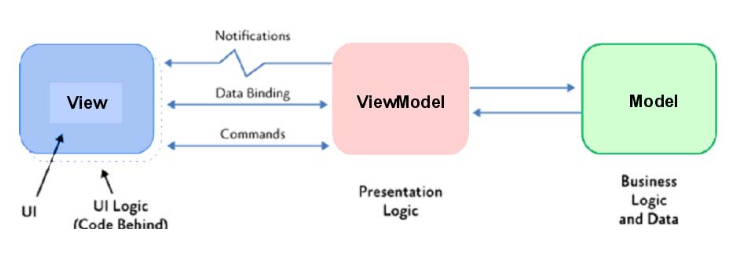
- Model Is the data container and contains the business logic and data
- View Implements displaying the data and user interactivity. Importantly, the view holds the active control
- ViewModel TODO
Razor
Razor uses the same infastructure as the MVC part of ASP.NET. However, instead of MVC, it uses the MVVM model.
View and ViewModels
//FILE: IndexModel.cshtml
@page
@model IndexModel
<h2>Separate page model</h2>
<p>
    @Model.Message
</p>
By convention, for each *.cshtml file, a *.cshtml.cs file containg the PageModel should exist. Of course, since this is still ASP.NET, dependency injection is supported. The PageModel is by default per session.
//FILE: IndexModel.cshtml.cs
public class IndexModel : PageModel {
    public string Message { get; private set; } = "PageModel in C#";
    public void OnGet()
    {
        Message += $" Server time is { DateTime.Now }";
    }
}
The purpose of a PageModel is to provide seperation between the UI and the model. Methods which handle incoming requests, are invoked based on a naming scheme: On(Get|Post|Put|Delete)[Async]
If the Async-suffix is added, then the method can return a Task.
Blazor
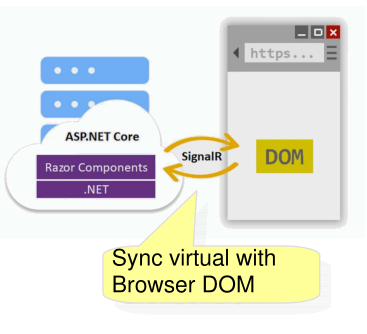
Blazor has a virtual DOM on the server, which is synchronized with the actual DOM of the browser.
Blazor Component
A blazor component consists of a view and code.
<div class="card" style="width:22rem">
    <div class="card-body">
        <h3 class="card-title">@Title</h3>
        <p class="card-text">@ChildContent</p>
        <button @onclick="OnYes">Yes!</button>
    </div>
</div>

@code {
    [Parameter]
    public RenderFragment? ChildContent { get; set; }
    [Parameter]
    public string? Title { get; set; }

    private void OnYes()
    {
        Console.WriteLine(
            "Write to the console in C#! 'Yes' button selected.");
    }
}
This is another example:
@page "/counter"
<PageTitle>Counter</PageTitle>
<h1>Counter</h1>
<p role="status">Current count2: @currentCount2</p>
<button class="btn btn-primary" @onclick="IncrementCount2">Click me</button>

@code {
    private int currentCount = 0;
    private void IncrementCount() {
        currentCount++;
    }
}
The code part can also be moved to a separate partial class.
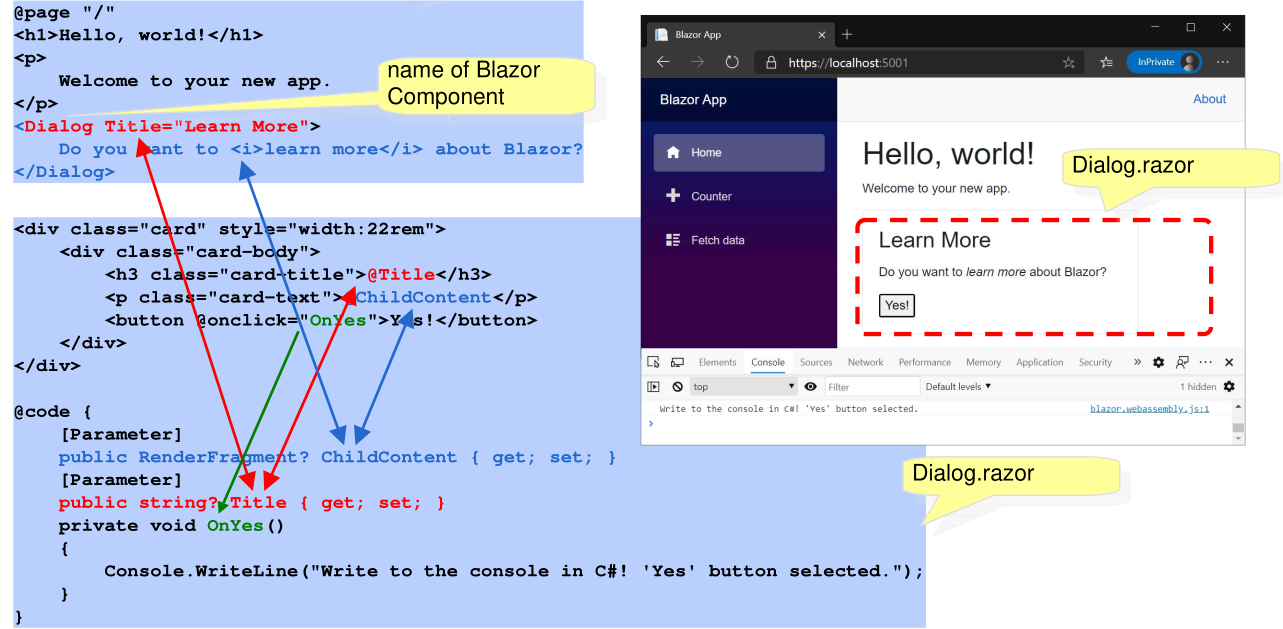
Components can also include other components. In the example above, the first view is the index page, which includes the Dialog-component. The Title is a parameter thats passed to the component. Additionally, the inner content of the Dialog element is passed in as ChildContent.
One can use @inject <className> <nameInView to inject an object with dependency injection. For example @Inject WeatherForcastService ForcastService. Then in the subsequent view, ForcastService can be used in the code or in the view part.