Systemd
Systemd manages the system in a holistic way.
Unit
Systemd manages services in units.
Units have a state:
- active: The unit is started,bound, etc. depending on the type
- inactive: The unit is stopped, unbound, etc. depending on the type
- activating/deactivating: In the process of being activated/deactivated
- failed: The unit failed in some way, while activating/deactivating or while running
There are different types of units:
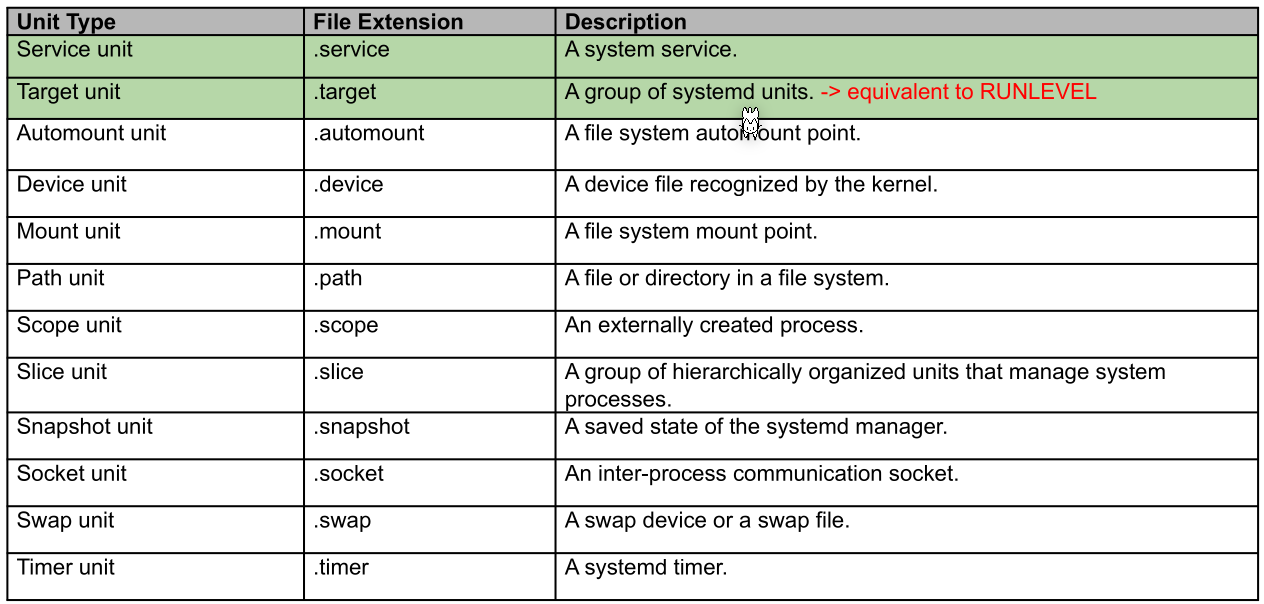
A target unit (.target) is the equivalent of run levels in system v, but additionally, Systemd maintains that level. Target units are also called synchronization points. (Details can be viewed in man systemd.target)
The following is an example for a Systemd unit:
The following needs to be in the example:
- positive and negative dependencies
- ordering of dependencies
[Unit]
Description=Docker Application Container Engine
Documentation=https://docs.docker.com
After=network-online.target docker.socket firewalld.service containerd.service time-set.target
Wants=network-online.target containerd.service
Requires=docker.socket

[Service]
Type=notify
ExecStart=/usr/bin/dockerd -H fd:// --containerd=/run/containerd/containerd.sock
ExecReload=/bin/kill -s HUP $MAINPID
TimeoutStartSec=0
RestartSec=2
Restart=always

[Install]
WantedBy=multi-user.target
Units are usually placed in /lib/systemd/system/.
Slice Unit
A slice is a hierarchical way to group units and constraint resources.