Firewall
A firewall is a device that sits between two or more networks to control the packet flow between them.
A firewall can:
- Control access from the internal (company) network to the internet
- Control access from the internet to the internal computers
- Block malicious incoming web traffic
- ...
Packet Filtering Firewall
This firewall operates on the network and transport layer and packets (with IPs and ports). However, application data is not inspected.
An advantage is how fast those firewalls are, but the content of the traffic is not inspected.
Stateful Packet Filtering Firewalls
A stateful packet filtering firewall tracks TCP connections and UDP sessions. The firewall stores information about the session, like protocol, source/destination address, ports, session duration, protocol phase in TCP and many more.
Application-Layer Firewall
This firewall operates on the application layer. To do this, they split the end-to-end connection. This results in a connection between the server and the firewall and the firewall and the client.
While this allows deep inspection data, it is relatively slow, encrypted data can be a limit and this firewall are usually optimised for one specific protocol. Additionally, the security depends on how up-to-day the firewall is.
Typical Scenario
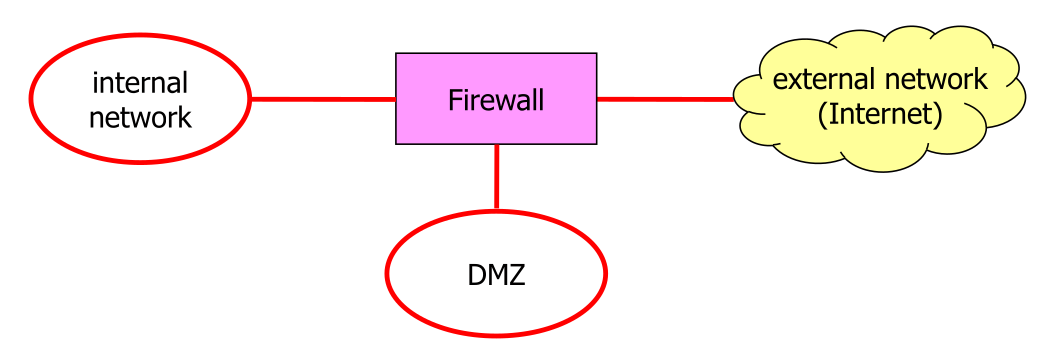
All traffic from the internet has to go through the firewall and usually a connection can only be initiated from the internal network.
The purpose of the DMZ is to provide a space for externally accessible server. From the internal network and the internet can a connection be initiated to the DMZ. If a server in the DMZ gets hacked, the traffic still has to go through a firewall.

This provides largely the same benefits
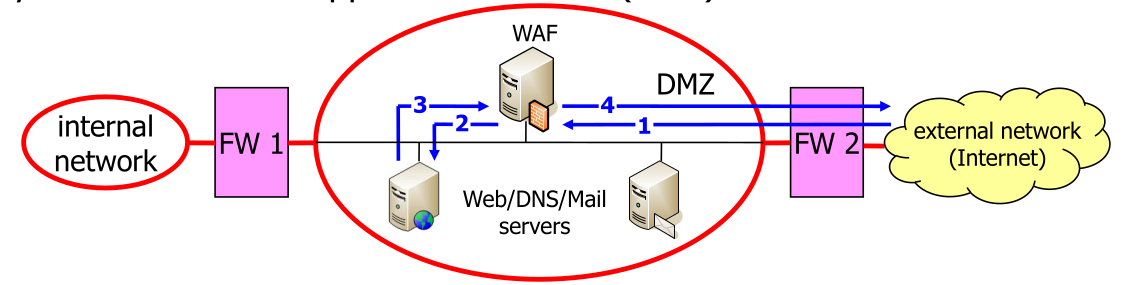
The diagram above shows a diagram with a Web Application Firewall (WAF), which is in front of the server accessible from the external network.
Limitations
Firewalls create a perimeter around the internal network and can control the access to this internal network. However, if a hacker can circumvent the firewall somehow, the firewall becomes entirely useless.
Additionally, most firewall can't inspect the application data.
Netfilter/Nftables
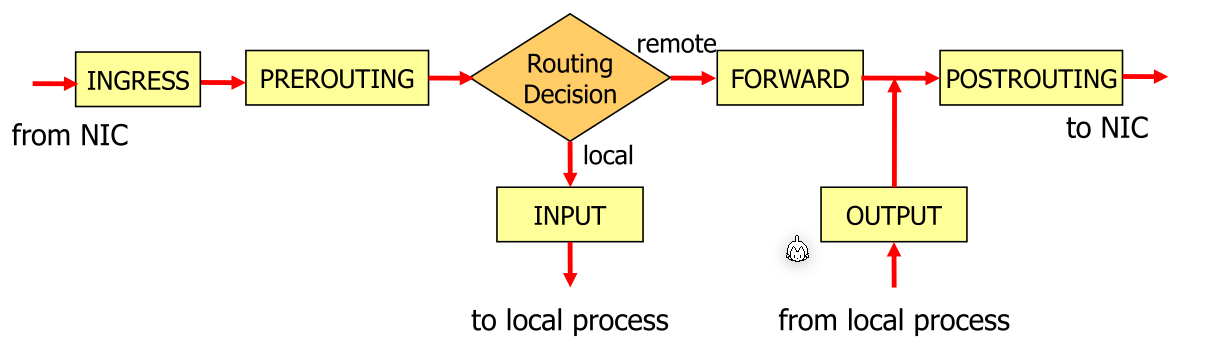
The diagram above shows how the Linux kernel handles network packages and what hooks are called during the processing of a packet.
Nftable Rules
A rule has a classification part and an action part. The classification says to which packet this rule applies and the action what to do with this package. Typical rules are:
-
Accept Continue to process the packet
-
Drop Stop processing the packet
-
Reject
Stop processing the packet and tell the sender with an ICMP "port unreachable" packet
- Jump Continue processing the packet somewhere else
Here are some examples for rules:
ip saddr 8.8.8.8 ct state new  accept # the source address = 8.8.8.8 and enable ct for this connection

ip daddr 8.8.8.8 drop # daddr = destination address

ip daddr 8.8.8.8 counter drop # counts all packets to 8.8.8.8 and then drops it

ip daddr 8.8.8.8 reject # rejects all packets to the ip 8.8.8.8

# does the same thing, but sends a ICMP host-prohibited message
ip daddr 8.8.8.8 reject with icmp type host-prohibited

ip6 nexthdr tcp accept # accept all IPv6 packets carrying TCP (nexthdr=next header)

ip6 nexthdr != tcp accept # accept all IPV6 packets which don't carry TCP

# (iifname = input interface name) accept all packets comming on the innterface eth2
iifname eth2 accept

# Accept a max of 10 ICMP echo messages per second
icmp type echo-request limit rate 10/second accept

# Reject packets from multiple ip addresses
ip daddr { 8.8.8.8, 1.1.1.1 } reject

# Accept packets going to port 80 and 443
tcp dport { http, https } accept

# Accept ICMPv6 neighbour-discovery packets
icmpv6 type { nd-neighbor-solicit, nd-neighbor-advert, nd-router-solicit, nd-router-advert } accept

# combine multiple conditions. The order matters
ip saddr 10.0.0.0/8 tcp dport ssh accept
# (saddr 10.0.0.0/8) (tcp dport ssh)
The followings are conditions:
iifname $ifc accept # accept if input interface name = $ifc
oifname $ofc accept # accept if output interface name = $ofc

ip saddr 8.8.8.8 accept # the source address = 8.8.8.8
ip daddr 8.8.8.8 accept # the destination address = 8.8.8.8

nexthdr tcp accept # next header (=nexthdr) carries tcp
nexthdr tcp != accept # next header (=nexthdr) has to not carry tcp

ip6 accept # accept all ipv6 packets

icmp type echo-request accept # accept ping request
icmp type echo-responde accept # accept ping response

tcp dport { http, https, 30 } accept # accept tcp ports to http, https and port 30

limit rate 10/second accept # rate limit

tcp flags == syn accept # only initial tcp connection request

ct state established,related accept # accept established and related connections (if connection tracking is enabled)
Chains
A chain contains rules and a default policy. By default policy is accept if not changed. A chain which is called on a hook are Base-Chain and chains which are not associated with a hook are called non-base-chain.
Linux goes through the chain top-down until a rule matches.
Chains have types, but we only have looked at filter. Similarly, chains also have a priority.
These are some examples for chains:
# name ssh-traffic is just a name used to refer to this chain
chain ssh-traffic {
    # specifies the type=filter and the used hook is INPUT
    # the priority is 0 and the default policy is drop
    type filter hook input priority 0; policy drop;
    # one filter in the chain
    tcp dport ssh count accept
}
chain tcp-traffic {
    type filter hook input priority 0; policy drop;
    # if this rule matches, go to http-traffic chain
    tcp dport { https, http } jump http-traffic
}
chain http-traffic { # non-base-chain
    # no input hook -> non-base-chain
    type filter; policy drop;
    # no condition, matches everything
    count accept
}
Tables
Chains must be wrapped in a table directive. Tables have a packet family for which they are used. ip = IPv4, ip6 = IPv6 and inet = IPv4 and IPv6
#!/usr/sbin/nft -f
flush ruleset # clear all tables and chains

# inet = ipv4 and ipv6
table inet mytable {
    chain tcp-traffic {
        type filter hook input priority 0; policy drop;
        tcp dport { https, http } jump http-traffic
    }
    chain http-traffic { # non-base-chain
        type filter; policy drop;
        count accept
    }
}
By using the #!/usr/sbin/nft -f , this can be executed as a shell script. All changes will be done in an atomic fashion.
Variables
These scripts can also use variables:
#!/usr/sbin/nft -f
define ifc = eth1
define svcs = { ssh, http, https }
define net6 = 2001:db8:2:c::/64
table inet myfilter {
    chain myinput {
        type filter hook input priority 0; policy drop;
        iifname $ifc ip6 saddr $net6 jump ip6-input
        tcp dport $svcs accept
    }
}
Example
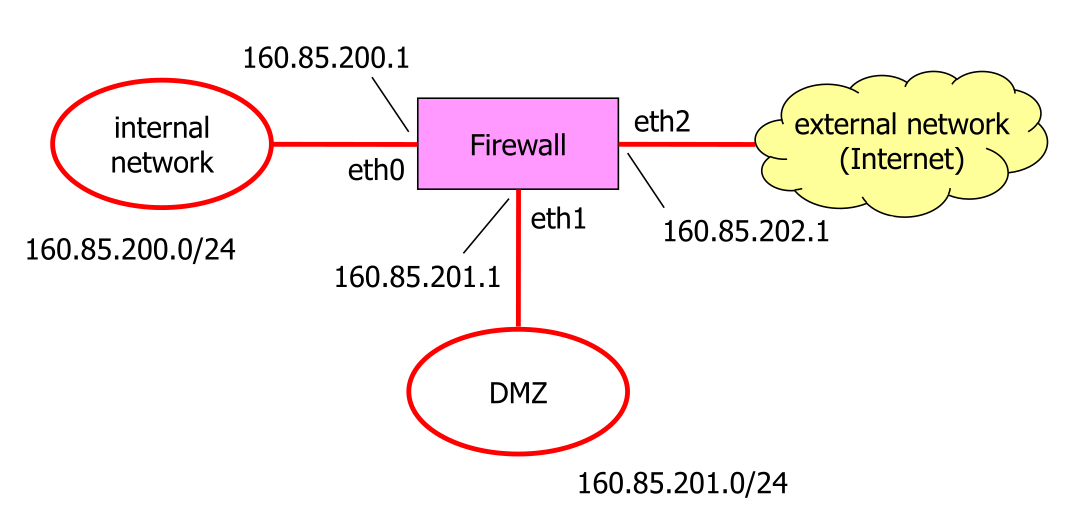
#!/usr/sbin/nft -f
define iifc = eth0 # Interface to internal network
define difc = eth1 # Interface to DMZ network
define eifc = eth2 # interface to external network
define inet = 160.85.200.0/24 # Internal network
define dnet = 160.85.201.0/24 # DMZ network
#define enet = # Not defined
define iaddr = 160.85.200.1 # FW address on internal net
define daddr = 160.85.201.1 # FW address on DMZ
define eaddr = 160.85.202.1 # FW address on external net

table ip myfilter {
    # chain to local processes
    chain myinput {
        type filter hook input priority 0; policy drop;
        # allow internal host to ping the firewall
        iifname $iifc ip saddr $inet ip daddr $iaddr icmp type echo-request accept
    }
    # chain from local processes
    chain myoutput {
        type filter hook output priority 0; policy drop;
        # allow the firewall to reply to ICMP echo request from the internal network
        oifname $iifc ip daddr $inet ip saddr $iaddr icmp type echo-reply accept
    }

    # chain for forwarded packages
    chain myforward {
        type filter hook forward priority 0; policy drop;
        # allow hosts from external network to communicate the DNS server in the DMZ
        iifname $eifc oifname $difc ip daddr 160.85.201.67 udp dport domain accept
        # allow the DNS server to send packets outwards (to reply)
        iifname $difc oifname $eifc ip saddr 160.85.201.67 udp sport domain accept

        # allow internal hosts to connect to the web server on the external network
        iifname $iifc oifc $eifc ip saddr $inet tcp dport http accept
        # filter packets from the external network to the internal connected
        # with a sync flag set (used to initiated the tcp connection)
        iifname $eifc oifc $iifc ip daddr $inet tcp sport http tcp flags != syn accept
    }
}
Stateful Chains
To enable connection tracking, ct has to be specified.
chain myinput {
    type filter hook input priority 0; policy drop;
    # enables connection tracking
    # This means, if there is an already established connection or a connection
    # related to an existing connection, this packet should be accepted.
    ct state established,related accept
    # the "ct state new accept" creates an established connection in the tracker
    iifname $iifc ip saddr $inet icmp type echo-request ct state new accept
}

chain myoutput {
    type filter hook output priority 0; policy drop;
    # This accepts all packages with an already established or related connection
    ct state established,related accept
}

chain myforward {
    type filter hook forward priority 0; policy drop;
    ct state established,related accept
    iifname $eifc oifname $difc ip daddr 160.85.201.67 udp dport domain \
        ct state new accept
    iifcname $iifc oifname $eifc ip saddr $inet tcp dport { http, https } \
        ct state new accept
}
NAT
The following enables network address translation (NAT) for addresses
define i4nw = 10.109.1.0/24      # Internal IPv4 network

define eifc = ens5               # Interface name to external network
define e4nw = 10.109.3.0/24      # External IPv4 network
define e4ad = 10.109.3.5         # External IPv4 address

table ip mynat {
    chain mysnat {
        type nat hook postrouting priority 0;

        oifname $eifc ip saddr $i4nw ip daddr $e4nw snat $e4ad
    }
}
Port Scanning
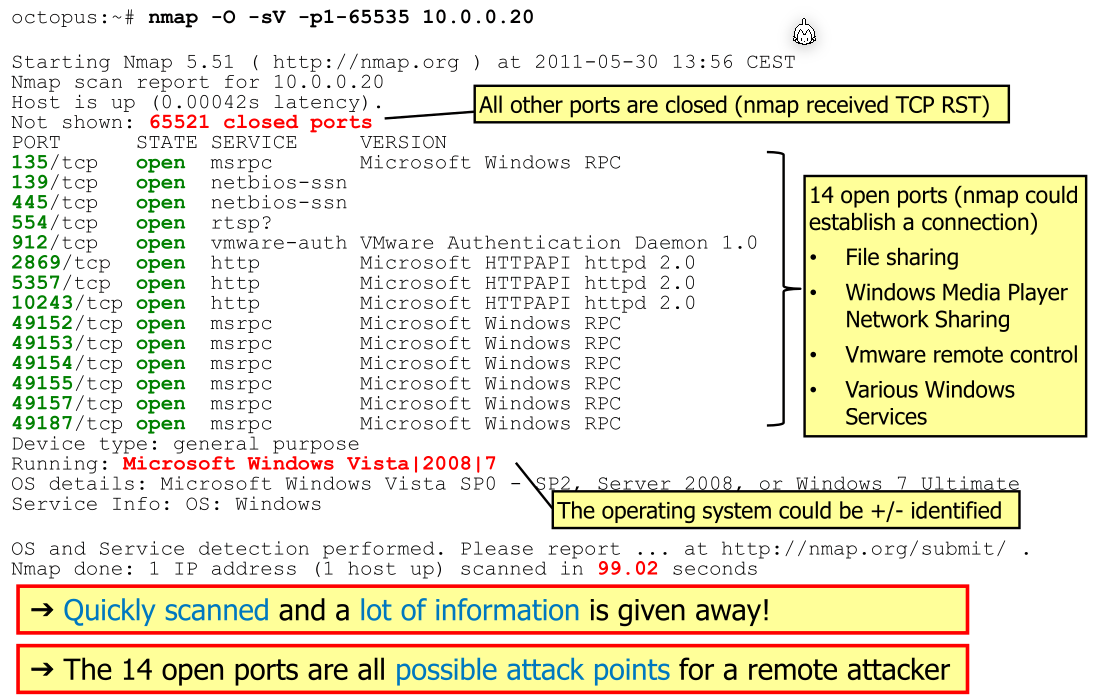
With port scanning, an actor can determine the services running on a host.
The following steps are usually done:
- Check if the host is available by pinging it
- Establishing a TCP connections to the ports
- If a connection can be stablished, then a service is available
- If the server responds with a TCP RST, then no service is available
There are also UDP scans, which sends datagram to the ports and receive either and answer or an ICMP port unreachable message (or nothing).
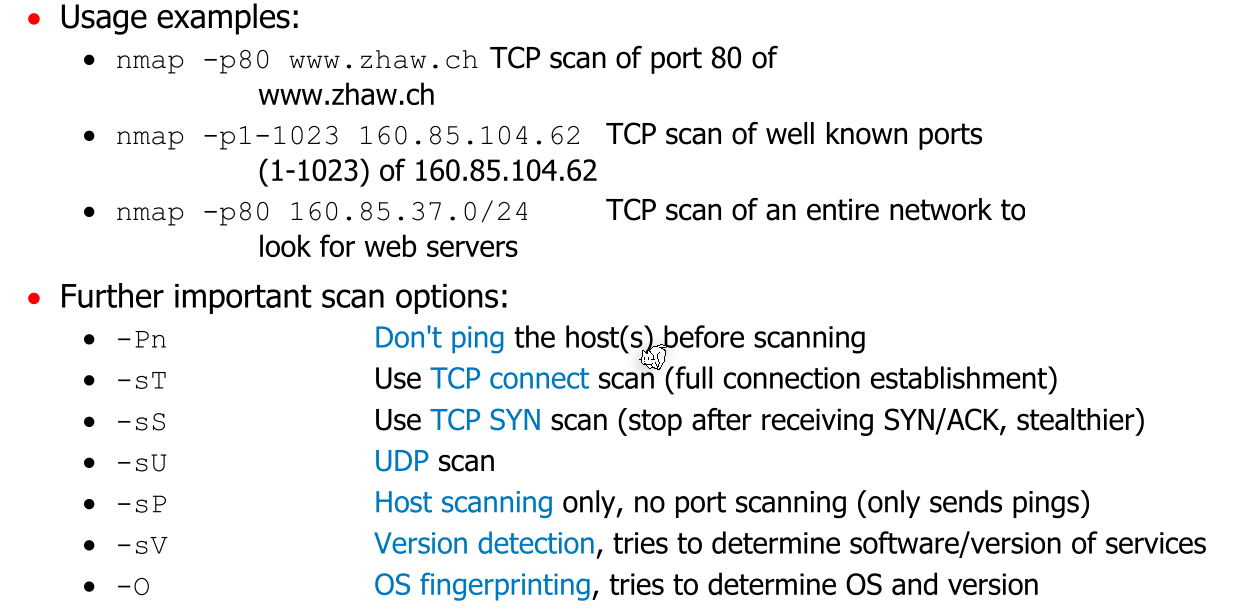
nmap