Tool Chain
A tool chain are the tools required to build an executable from the source code. There are both native and cross compiler tool chain. Native tool chains run on the same environment which the software will run on later, while a cross compiler creates an executable which runs in a different environment.
Modules
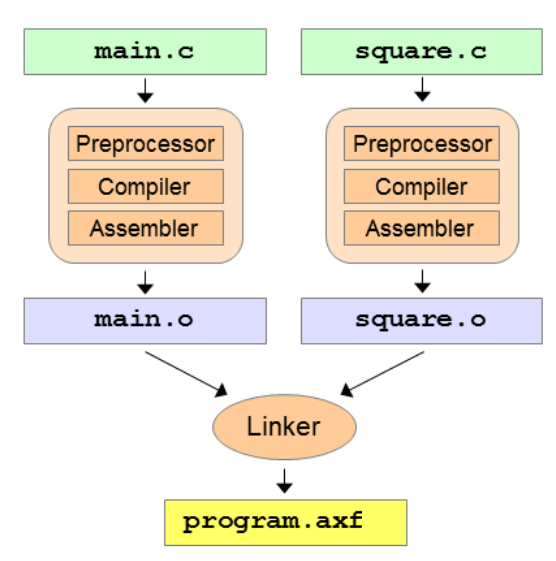
Each c (or assembler) file is viewed as a module and is processed one-by-one by the preprocessor, compiler and the assembler. All compiled modules are combined by the linker.
C
The two rules of C:
- Names declared before use
- One definition rule A variable or function can be declared multiple times, but can only be defined once in the same scope
Declaration vs Definition
The following code only defines the names of a funciton, variable or struct. But their details aren't known to the compiler when compiling this module. (E.g. accessing a field of a struct wouldn't be possible)
uint32_t square(uint32_t v);    // square function defined elsewhere
extern uint32_t counter;        // counter variable defined elsewhere
struct S;                       // struct S type defined elsewhere
The following code defines the a function, variable or struct with their details.
uint32_t square(uint32_t v) { ... }     // square function definition
uint32_t counter;                       // counter variable definition
struct S { ... };                       // struct S type definition
Header Files
// square.h
#ifndef _SQUARE_H_ // incl.-
#define _SQUARE_H_ // guard
// declaration of square
uint32_t square(uint32_t v);
#endif // end of incl.-guard
The matching c file is:
Linkage Reference
| C names | ASM Symbols | OBJ Symbols | AXF Executables | |
|---|---|---|---|---|
| external linkage (export) | extern (default) |
EXPORT-labels for exported labels |
Global | |
| external linkage (import) | extern(default) |
IMPORT-labels for imported labels |
References | |
| internal linkage | with static |
normal labels | Local | |
| no linkage | local variables | - | - |
Libraries
Libraries can be dynamically or statically linked.
A static linked executable contains all required libraries. While this results in a bigger file as every executable needs to include the same libraries, it also prevents DLL-Hell.
Linker
The linker has three tasks: merging code and data sections, resolving symbols to other modules and relocating address.
Object and ELF Files
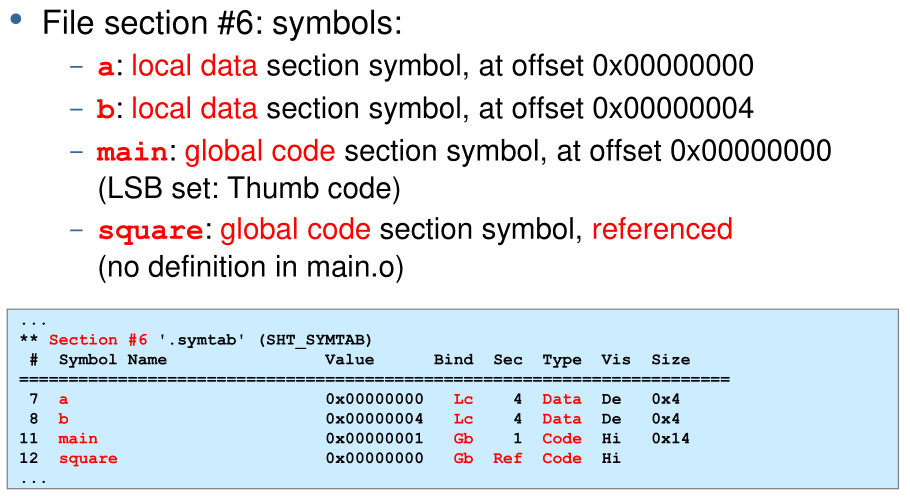
Object files are the input to the linker and contain the compiled data of a module:
- Code section
Code and constants of a module. The addresses start at
0x00 - Data section
All global variables of the module. The addresses start at
0x00 - Symbol table All symbols and their attributes (e.g. global, local, reference, etc)
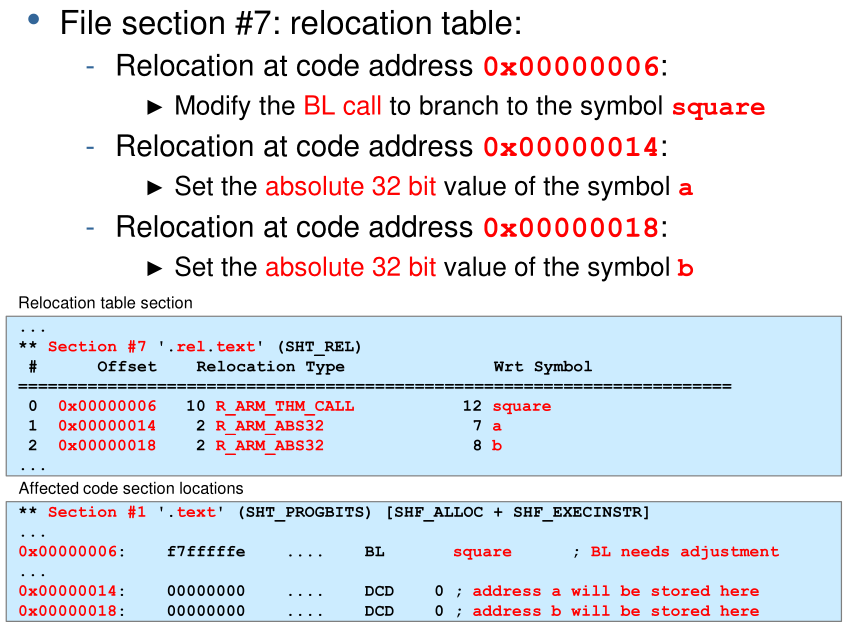
- Relocation table Which and how bytes of the data and code sections need to be adjusted after merging the sections
The executable and linkable format (ELF) can contain code sections, data sections and symbol table as well, which might get used on a system with a loader (like linux).
Example of Linking an Object File
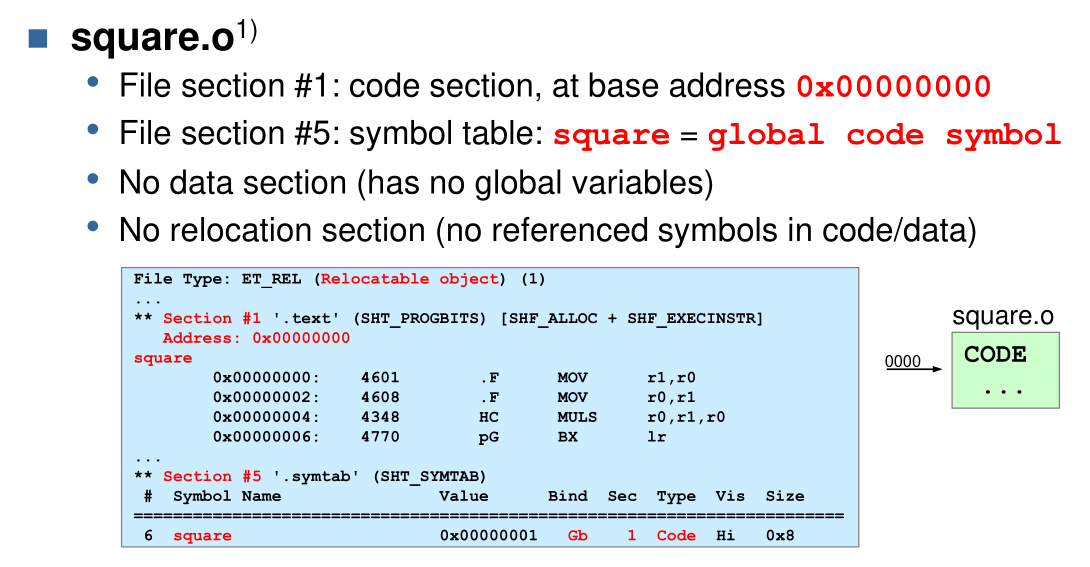
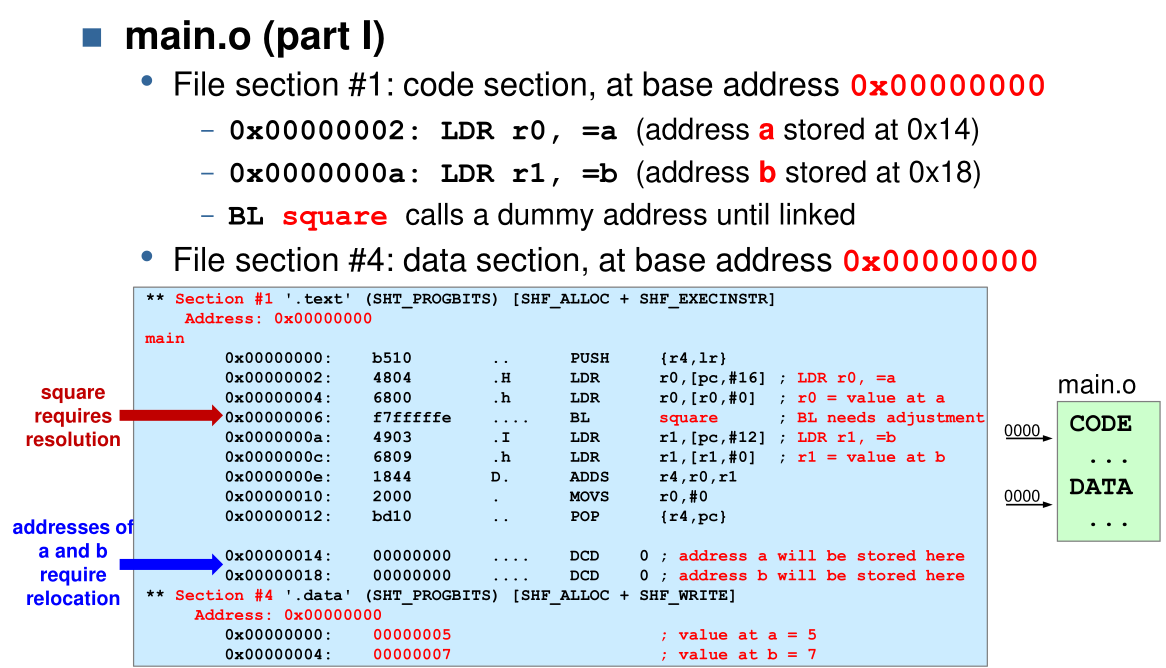
The following shows an example of the object files squere.o and main.o:
Merging
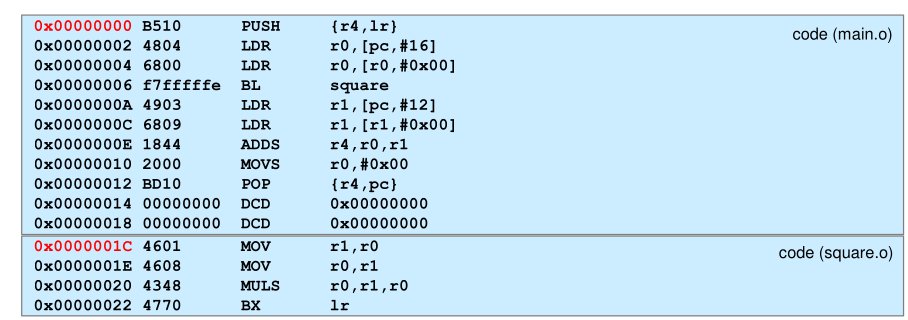
In the first step square.o and main.o are merged. Code sections and data sections are just stitched together. But references within the code sections are still wrong.
Resolving
In this step references are resolved. This can be seen in the following symbol table where the reference to square has been replaced. However, the relative addresses are not relocated and start at 0x00.

Relocation
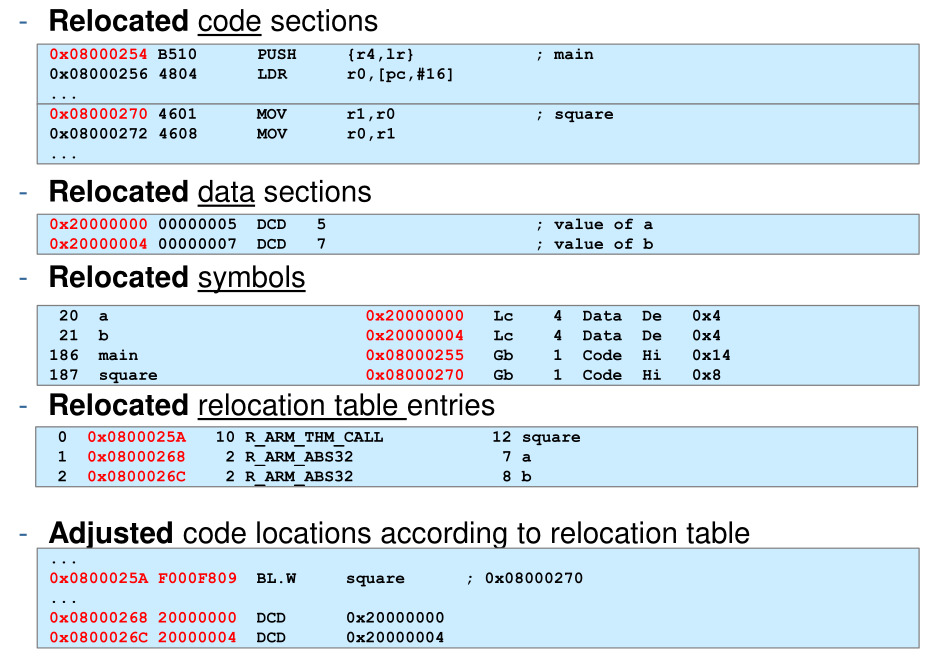
In this steps all relative addresses are recalculated to global addresses. This affects the addresses of sections, symbols and offsets. This is done with \(GlobalAddress=GlobalBase+MergeOffset+ModuleRelativeOffset\)
- The
GlobalBaseis the base address of where the content of the ELF file are loaded. For the STM32 the internal SRAM starts at0x2000'0000 - The
MergeOffsetis the offset of the module. E.g. the merge offset ofsquare.ois0x0000'001C. - The
ModuleRelativeOffsetis the offset within the module