JavaScript
Numbers
All numbers are 64 bit floating point numbers (following the IEEE 754 standard). As this includes all 32 bit integers, those can be stored exactly.
Additionally, there are the special "numbers" Infinity, -Infinity and NaN.
Strings
Strings in JavaScripts are a sequence of 16-bit Unicode characters. In "..." and '...' strings, the backslash (\) is as an escape sequence. In template strings (`...`) strings a \ is rendered. Additionally, string interpolation can be done with `...${var}...`.
Emojis can be made up of multiple 16-bit Unicode-characters. str.charAt(pos) will return only one character of those two. str.codePointAt(pos) will return the whole emoji UTF-character. "🤦".length will return 2 because it is made up of two 16-bit Unicode characters.
BigInt
With BigInt(3) or 3n, a big integer is created. Big ints cannot be added, subtracted, multiplied or diveded by types other than other big ints. One exception is concating with strings, which still works.
Objects
delete obj.name deletes the name property of the object obj.
With "name" in obj the program can check if the property name is in the object obj. in checks the object itself, as well as the prototype chain.
With delete obj.key can the key property be deleted.
The syntax obj?.name is approximately equivalent to obj && obj.name and will return the value of name or undefined if obj is null/undefined.
Methods of interest:
Object.keys(obj)Returns the keys of an objectObject.values(obj)Returns the values of an objectObject.assign(obj, ...otherObjects)Returnsobjbut with the properties of theotherObjects.Object.create(prototype)Returns a new object with the given prototype.
Arrays
// The for-in loop should not be used for arrays.
// It doesn't guarantee the order and inherited properties are also enumerated
for(let key in myArray) {
    if(myArray.hasOwnProperty(key)) {
        doSomethingWith(myArray[key])
    }
}

for (let entry of myArray) {
    doSomethingWith(entry)
}

myArray.forEach((entry, key, array) => doSomethingWith(entry))
Methods of interest:
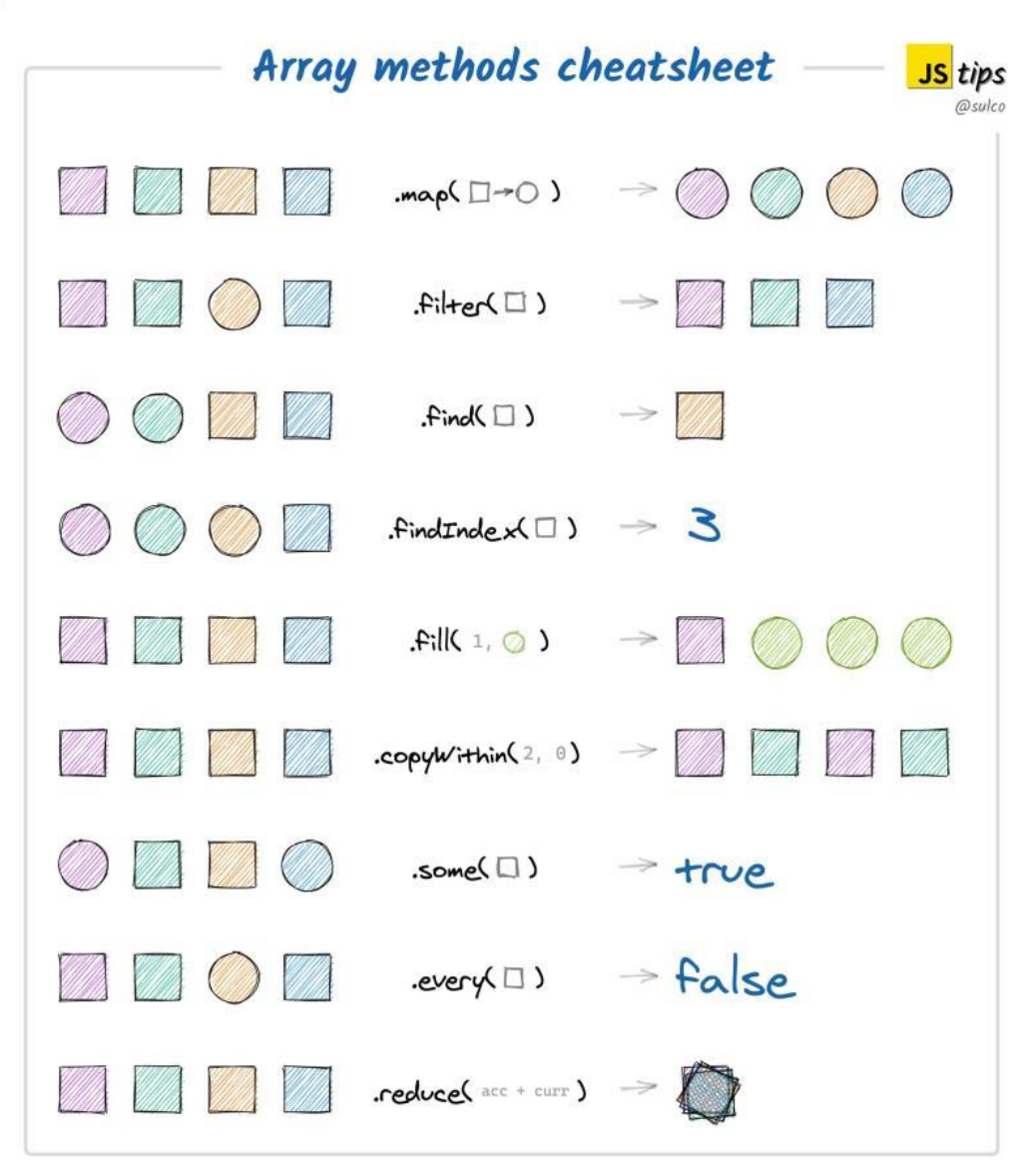
Array.isArray(obj)Checks if the givenobjis an array.arr.lengthReturns the number of keys with a number key. Other properties are ignoredarr.push(element)Adds an element at the endfirstEl = arr.shift()Removes the element at index0and returns itarr.unshift(element1, element2, ...)Adds the given elements at the beginning of the array
Reference and Value Data Types
string, number, boolean are value data types. object, array and function are reference data types.
- value data types
- When comparing their value is compared (except
NaNwhich is alwaysfalse) - Cannot be modified (
numVar.hi = "hello world"won't add the keyhitonumVar) - reference data types
- Compared by reference
- Can be modified
Modules
Before other module systems:
CommonJS:
const {Wheel} = require('./steering')
const car = {
    brand: 'Ford',
    model: 'Fiesta',
    steering: new Wheel()
}
module.exports = {car} //would be importat as const {car} = require('./car-lib')
ES6 module system:
/* square.js */
const name = 'square'
function draw (ctx, length, x, y, color) { ... }
function reportArea () { ... }
export { name, draw, reportArea }

/* other js file */
import { name, draw, reportArea } from './modules/square.js'
this
this refers to the caller's object. However, every function can be called without an object. In this case, this refers to the global object or is undefined if "use strict" is specified at the beginning of the file or function.
this can be bound to a function using Function.prototype.bind(thisObj, ...args), which will return a new wrapper function.
With Function.prototype.call(thisObj, ...args) can a function be called immediately. Likewise with Function.prototype.apply(thisObj, argsArray), but apply takes an array instead of a var-arg.
Prototype
With Object.getPrototypeOf(obj) the prototype object of obj can be returned. Types (like Object, or String) have a property prototype. Object.prototype will return the prototype of the "class".
An object with a specific prototype can be created using Object.create(protoObj). The returned object will have the given prototype object.
The constructor of a prototype is stored in Object.prototype.constructor.
Classes
function Person (name) {
    this.name = name
}

Person.prototype.toString = function () {
    return `Person with name '${this.name}'`
}

console.log(Person.prototype.constructor == Person) // will return 'true'

let p35 = new Person("John")
class Employee extends Person {
    constructor (name, salary) {
        super(name)
        this.salary = salary
    }

    toString () {
        return `${super.toString()} and salary ${this.salary}`
    }

    get salary100 () { return this.salary * 100 / this.percentage}
    set salary100 (amount) { this.salary = amount * this.percentage / 100 }
}

let e17 = new Employee("Mary", 7000);
console.log(e17.toString()) /* → Person with name 'Mary' and salary 7000 */
console.log(e17.salary)     /* → 7000 */
Event Loop
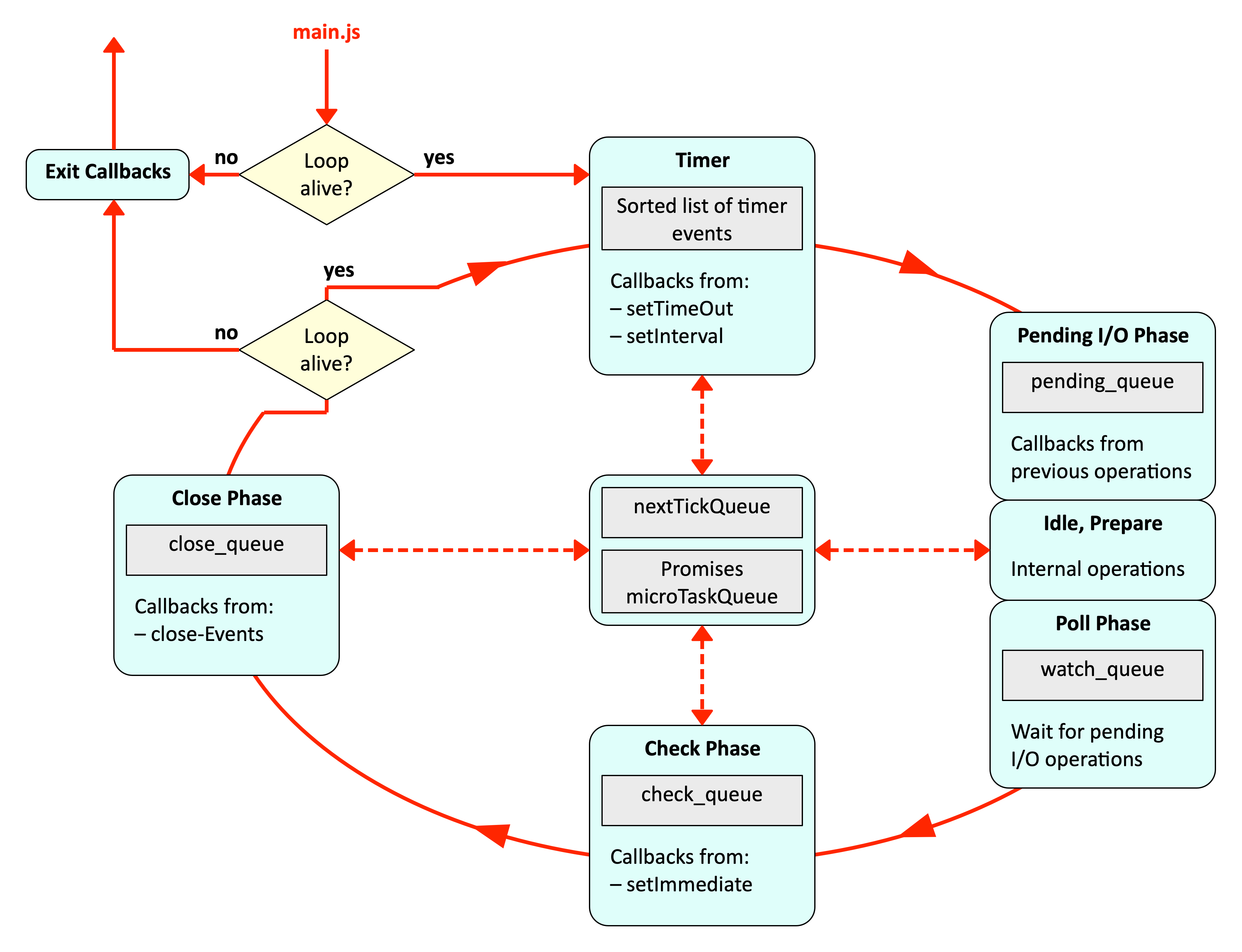
const id = setImmediate(() => ...) works like setTimeout(fun, timeoutInMillis) or setInterval(fun, intervalInMillis)
Promises and tasks in the nextTickQueue (in the middle) are processed between phases (in node since version 11). The nextTickQueue is processed before promises.
Promise.resolve().then(() => console.log('promise resolved'))
setImmediate(() => console.log('set immediate'))
process.nextTick(() => console.log('next tick'))
setTimeout(() => console.log('set timeout'), 0)

setTimeout(() => {
  console.log("start timeout")
  process.nextTick(() => console.log("in nextTick() in setTieout()"))
  console.log("end timeout")
}, 0)
//next tick
//promise resolved
//set timeout
//start timeout
//end timeout
//in nextTick() in setTieout()
//set immediate
Promise
The function given to the Promise constructor is executed synchronously. Only the first resolve(...), reject(...) or throw ... has an effect on future stages.
const promise = new Prommise((resolve, reject) => {
    throw Error('fail')
    resolve()
});

promise
    .then (() => console.log('step1')) // is skipped because of `throw Error('fail')`
    .then (() => { throw Error('fail') }) // skipped
    .then (() => console.log('step2')) // skipped
    .catch(() => console.log('catch1')) // will be printed
    .then (() => console.log('step3')) // will be printed
    .catch(() => console.log('catch2')) // skippped
    .then (() => console.log('step4')) // printed
/*
printed:
catch1
step3
step4
*/
Promise.all(promises) returns a new promise which waits for all given promises to finish. Promise.reace(promises) returns a promise, which resolves to the result of the first resolving or rejecting promise.